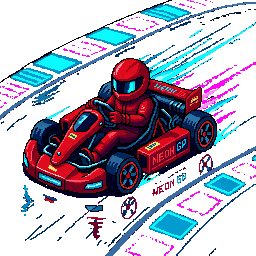
Pixel Kart is a free browser kart racer with a view from behind the kart, drifting, nitro, and items. You race three AI opponents over three laps. This May announcement introduced Sunset Circuit and Neon Speedway; the current game also includes Glacier Pass and community tracks.
Key Takeaways
- Pixel Kart is a free kart racing game played in your browser — a rear-view track perspective and three AI rivals.
- Drift, drop bananas, fire green shells, and chain nitro charges across courses including Sunset Circuit, Neon Speedway, and Glacier Pass.
- Full mobile support with on-screen joystick + GO/HB/USE/NOS buttons; full keyboard layout on desktop with handbrake drift and nitro.
- Three difficulty tiers, three laps per race, position-weighted item drops so the back of the pack actually has a chance.
What Pixel Kart actually feels like
The track stretches toward the horizon while you steer through each corner. Read the turn ahead, choose where to start drifting, and straighten up before spending your boost. If you like older console kart racers, the viewpoint will be familiar.
Pixel art scenery gives each course a different setting, but learning the corner sequence matters more than the view. Use a first race to find where you lose speed or drift off the road.
A race lasts three laps. Its length depends on the track and how you drive.
Two tracks, two moods
Pixel Kart launched with two built-in tracks:
- Sunset Circuit — long sweeping curves, an orange-magenta sky, palm-tree silhouettes streaming under your wheels. The opener course. Forgiving lines, but you can still wreck a lap on the wrong drift entry.
- Neon Speedway — purple cyber palette, tighter corners, a rhythm that punishes you for braking too late. The track to learn handbrake drift on.
Sunset Circuit and Neon Speedway were the two launch courses. You can now try Glacier Pass as well, or use the track editor to build and share a circuit.
Drift, nitro, and items — the three things that change every lap
The control scheme on desktop is laid out so that one hand stays on the arrow keys for steering and gas, and the other hand juggles the three things that actually matter:
- SPACE — handbrake drift. Long corners turn into power slides. Hold it through the apex, let go on the exit, the kart rockets out at full speed.
- SHIFT — nitro. A short burst of speed. There's a charge meter that refills slowly. Burn it on the back straight or save it for the final lap.
- E — use item. Bananas, green shells, boost charges. Item drops are weighted by your position in the race — trailing racers are more likely to receive catch-up items. Your position influences the item pool, but a useful item does not guarantee a comeback.
On mobile, use the touch joystick and labeled GO, HB, USE, and NOS controls. Follow the orientation prompt and check the button positions before the race starts.
Three AI rivals who actually race
Each race puts you against three AI rivals. Watch their position before entering a corner; traffic can change the line you planned to take.
Choose Easy, Normal, or Hard from the race settings. Start on Easy while learning drifting and item use, then raise the difficulty when you can keep a steady line.
Best for short sessions, repeat runs, and leaderboard chases
Three laps give you repeated chances to improve the same corners. Compare your results after each race and sign in for supported submissions to the PixelDen leaderboard.
You can choose a kart color, track, and difficulty without buying upgrades. Focus on one course at first so you can tell whether a change in braking or boost timing helped.
How to start racing
Open Pixel Kart, choose a color and difficulty, and start with Sunset Circuit if you want to learn the controls. Leave the first item pickup until you have a comfortable steering rhythm.
For another style of game from the same release period, read about Velvet Spin and Vault Run. The full catalog lists the current games.
FAQ
Is Pixel Kart free?
Yes. Pixel Kart is completely free to play in your browser. No download, no sign-in, no microtransactions. Pick a kart, pick a track, race.
Can I play Pixel Kart on my phone?
Yes. The game provides a touch joystick and GO, HB, USE, and NOS buttons. Follow the landscape prompt and check that the controls fit your screen.
What controls does Pixel Kart use on desktop?
Arrow keys (or WASD) to steer and gas/brake. SPACE for handbrake drift. SHIFT for nitro. E to use your item. Check the controls on the game page before starting.
How many tracks does Pixel Kart have?
The launch had Sunset Circuit and Neon Speedway. The current game adds Glacier Pass, plus saved and community tracks through the track editor.
Are there power-ups or items in Pixel Kart?
Yes. Bananas, green shells, and nitro charges drop from item boxes on the track. The drops are weighted by race position so the back of the pack actually has a chance to come back.
What's Mode 7 and why does it matter for a kart racer?
The phrase describes the retro perspective effect: a flat course appears to stretch into the distance. For the player, the useful point is that you view the road from behind the kart rather than directly overhead.
Can I race against friends?
Races are against AI rivals. You can share custom tracks and compare supported leaderboard results with friends, but that is different from racing together in a live multiplayer match.
Race now
Play Pixel Kart, try a race on Sunset Circuit, and learn where to save your boost. For creating courses, continue with the track editor guide.