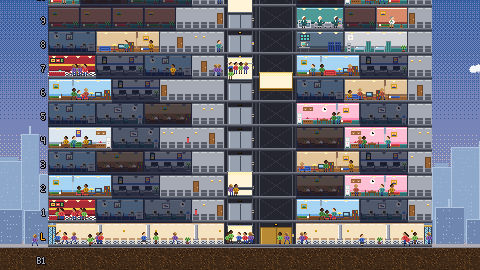
Liftwell is a free browser tower management sim. Build offices, condos, hotels, and shops, then connect them with elevators and stairs. As the population grows, long queues can drive tenants away and reduce the rent you need to keep building.
Key Takeaways
- Liftwell is a SimTower-style tower building sim in pixel art, played from a lift control panel with LED displays and round call buttons.
- Every person in the tower walks, queues and rides the lifts, and turns pink, then red, when they wait too long.
- The tower earns five stars, from 100 people for the second star to 750 people and a metro station for the fifth.
- Four lots each have a star goal and a deadline: Maple Street, Harbor Point, Midtown Exchange and the forty-floor Central Plaza.
- The game offers English, Spanish, and German text, plus keyboard, mouse, and touch controls.
A SimTower-style tower sim with a lift control panel
The tower appears in cross-section against a downtown skyline that changes from day to night. A control panel shows the time and funds along the top, with round tool buttons below. Use it to place rooms, inspect problems, and manage elevator service.
Everything you build is visible and alive. Office workers stream in every morning and leave in the evening. Families come home to their condos. Hotel guests check in at night, and housekeeping cleans their rooms in the morning. Visitors drift in from the street for fast food, the shops and the cinema. Each one of them is a little pixel person with somewhere to go.
How to build your first tower
Liftwell starts on a small corner lot on Maple Street, and the goal there is the second star within twelve days. That means 100 people living and working in your tower.
- Lay a lobby. Pick the Lobby tool and drag along the ground floor. This is the way in.
- Lay hallways upward. People walk along any unbroken row of rooms and hallway, and a lift only runs through floors that already exist.
- Build a lift. Pick the Lift tool and drag up through the floors. A standard shaft spans up to 15 floors.
- Add rooms. Offices pay rent every day once a company moves in. Condos are sold once to a family. Every room has to rest on something built below it.
- Add food. A fast food place on the lobby or a low floor earns from your workers at lunch and from visitors off the street.
On a computer you drag to place rows of rooms, hallways or a whole lift shaft. On a phone, tap a tool, tap the tower once to place the ghost and again to build.
The real puzzle: moving people
Every new floor creates more trips through the tower. People walk to an elevator, queue, ride, and continue to their destination. Cars answer calls as they travel, so adding rooms without enough transport can create delays on several floors.
When people wait too long they turn pink, then red. Tenants who are stressed day after day move out, and an empty office pays no rent. So you watch the tower and fix the jams:
- Add cars. Inspect a lift and add more cars, up to six per shaft.
- Build a second shaft next to a busy one.
- Close stops that few people use, so the cars stop wasting time.
- Use stairs for short hops. They connect one floor to the next with no wait, but climbing many of them is tiring.
- Go express. Express lifts are fast and can run the whole height of the tower, but they only stop at lobbies and basements. That is what sky lobbies on floors 15 and 30 are for.
Press E or the rating button to color every room green, amber or red by how stressful its trips are. It turns a tower full of tiny people into a clear map of what to fix.
Five stars and four lots
The tower earns stars as it grows, and every new star unlocks new rooms:
- Two stars need 100 people.
- Three stars need 250 people, a security office and a clinic.
- Four stars need 450 people, a recycling center and a VIP who enjoys a stay in your best suite.
- Five stars need 750 people and a metro station on the lowest basement floor.
From the second star you can build hotel rooms (with housekeeping to clean them), shops, the security office and the clinic. Hotel rooms and suites earn money every night, and shops, restaurants and the cinema earn from every customer.
The campaign is four lots, each with a star goal and a deadline:
- Maple Street, a small corner lot to learn the basics.
- Harbor Point, a waterfront lot full of tourists.
- Midtown Exchange, a busy block.
- Central Plaza, a forty-floor tower that needs everything you have learned.
Clear a lot to unlock the next. Run out of money for three nights in a row, or reach the deadline without the goal, and the run is over.
Money, VIPs and other ways to lose a tower
Upkeep for shops and services is paid at midnight, so a cinema that nobody visits slowly drains your funds. You can play while the money is below zero, but the bank counts every night you end in the red, and three in a row ends the run.
The VIP is a special test from the third star. They book your best suite, and the whole trip from the street to the suite and back has to be short and calm. Keep a clean suite free, have housekeeping in the tower and make sure the VIP never stands in a long lift queue. A happy VIP is one of the requirements for the fourth star.
When a lot's goal is met you can finish right away for a bonus for every day to spare, or keep building to push the score higher before the deadline.
Scores and leaderboards
Scores include stars, peak population, and remaining funds. Clearing a lot adds a completion bonus, with extra points for days left before the deadline. Sign in for leaderboard submissions and account-linked lot unlocks. An unlocked lot lets you start there; it is different from resuming an unfinished tower.
Frequently Asked Questions
Is Liftwell like SimTower?
Yes, it follows the same idea as the classic skyscraper sim of the mid 90s: a tower in cross-section, offices, condos and hotels, people who walk to lifts and turn red when they wait too long, and a star rating that unlocks new rooms. Each lot has a goal and deadline.
Is Liftwell free?
Yes. Liftwell is free to play in your browser with no download. An account connects supported scores, achievements, and unlocked lots. Check save and continue options before leaving an active tower.
Why is nobody moving into my offices?
A room has to be reachable from the lobby. If no lift or stairs connect its floor to the ground floor, it stays empty, and the Inspect tool shows a warning. Rooms that are slow to reach also rent out more slowly.
Why are my people turning red?
They are stressed, usually from waiting for a lift or climbing too many stairs. Add cars to a busy lift, build another shaft, close stops that rarely get used, or move tall towers onto express lifts and sky lobbies.
Can I play Liftwell on my phone?
Yes. In portrait mode the tower fills the screen with the tool buttons below. Tap a tool, tap once to place the ghost and again to build, and drag to scroll.
Build your first skyline
Start Liftwell on Maple Street and check travel times as you add rooms. If you enjoy managing connected systems, try the fields and machinery in Furrowfield. For a shorter tower game, Spire Tycoon uses a five-minute round.